Knowledge Work Plugins: Anthropic's plugins that make Claude a specialist for your role
- GitHub stars
- 27.2K
- plugins in the marketplace
- 123
- skills for a small business
- 44
Most people use Claude as a general chat. Anthropic open-sourced plugins that turn it into a specialist for one role: sales, marketing, finance, legal, support, or running a small business. Each one brings the skills, commands and tool connections that role needs.
What it is
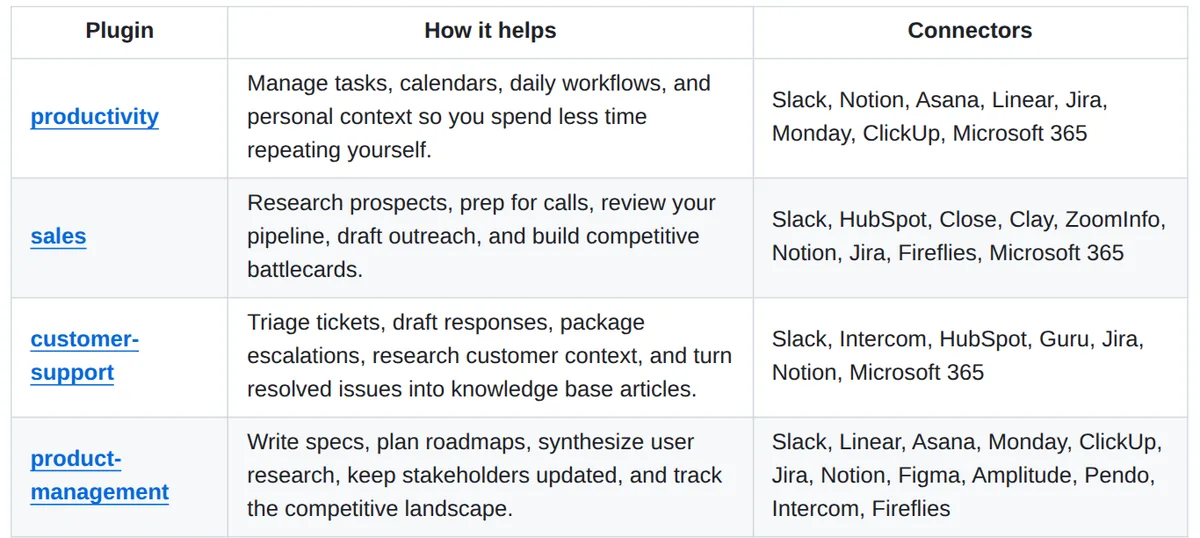
Official plugins from Anthropic, built for Claude Cowork and also working in Claude Code. Each one bundles skills, slash commands, sub-agents and connectors to the tools that role uses. Open source, Apache 2.0. A few of them:
- Small Business: 44 skills for money, sales, marketing, operations and hiring, with a router that understands plain requests like who owes me money.
- Sales: research prospects, prep for calls, review the pipeline and draft outreach.
- Marketing: plan campaigns, draft content, check brand voice and report on performance.
- Customer Support: triage tickets, draft replies and turn solved issues into help articles.
- Legal: review contracts, triage NDAs and assess risk.
- Plugin builder: make a new plugin or adapt one to your company's tools.
Every part is plain text files: no code and no servers. You can edit them to match your own terms and processes.
Steps
Step 1. Open Claude Code
Open it on your computer. If you use Claude Cowork instead, you can install the same plugins there from the plugin directory.
Step 2. Paste the prompt
Describe your work in one line in the prompt. Claude adds Anthropic's plugin marketplace, installs the plugin that fits you and explains its commands.
Step 3. Give it real work
Ask for a task from your actual week, like prep for tomorrow's call or a weekly report. The plugin's skills turn on by themselves.
Copy this into Claude Code
Add Anthropic's knowledge work plugins from github.com/anthropics/knowledge-work-plugins to my Claude Code. My work: [describe your job in one line, for example I run a small cleaning business]. Pick the one plugin that fits me best, install it and list its commands in plain words. Don't connect any of my accounts yet. Then suggest three tasks from my week it can do right now. If something doesn't install, explain what the problem is and fix it. I'm not a programmer: anything you can do yourself, do it yourself.
Want this working for your business?
- AI agents for your business
- Automations for the work you repeat
- 1:1 consulting calls
Good to know
Small business? Start here
Install the small business plugin and say get me started. Its setup connects your first two tools, runs one real task and learns your business. Every skill also works from a pasted email, a CSV or a PDF.
Nothing goes out without you
In the small business plugin, every skill pauses before it acts: nothing is sent, posted or paid without your say-so.
Make it yours
Swap the connectors for your own tools and add your terms and processes to the skill files. The plugin builder can do it with you.
Partner plugins too
The marketplace now lists 123 plugins, including ones from Canva, Figma, Zapier and HubSpot.
The honest read
- They are built for Claude Cowork first. Claude Code is supported, but Anthropic's instructions start with Cowork.
- They are generic starting points. Anthropic itself says they get much more useful once you customize them for your company.
- The small business plugin doesn't give financial, tax, legal or HR advice. Check what it produces before you use it.
- Most connectors are business tools you need your own account for. The small business plugin also works without them, from what you paste or upload.
Want this built for your business?
I build AI agents and automations for businesses, and do 1:1 consulting calls. Message me on Instagram with what your business does, and I'll tell you what can be automated.
Message me on Instagram