/last30days: research any topic from what people said this month
- GitHub stars
- 63.7K
- sources it can search
- 20
- agent apps it runs in
- 50+
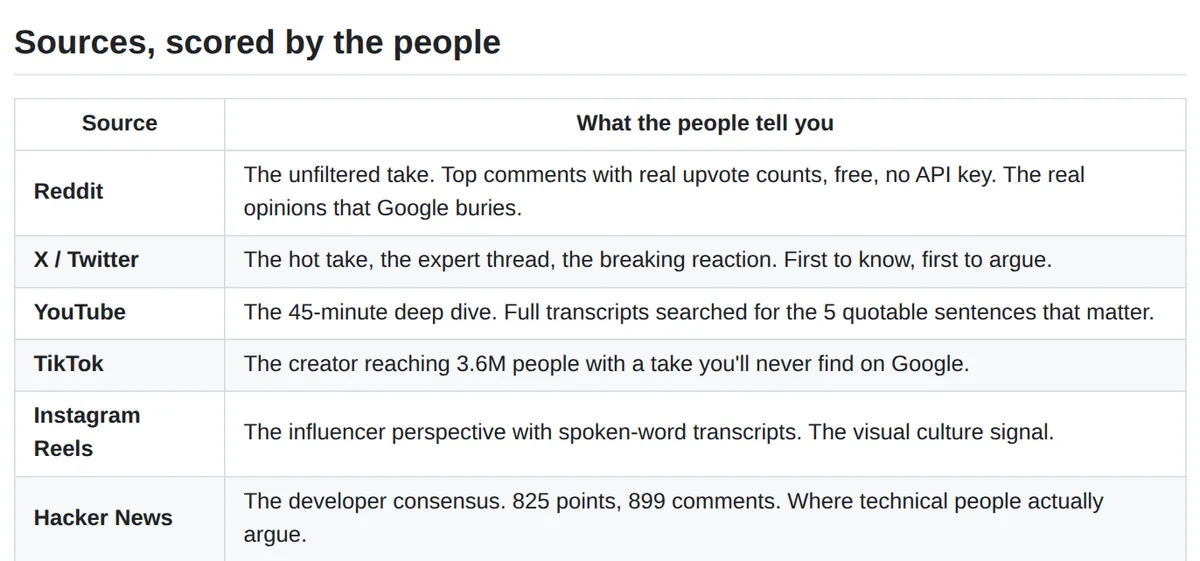
Google shows you what editors wrote. /last30days shows you what people are actually saying right now: it searches Reddit, X, YouTube, TikTok, Hacker News and more from the last 30 days, ranks it by real engagement and hands you one brief with sources.
What it is
A skill for Claude Code and 50+ other agent apps. You type a topic, a person, a product or two tools to compare. The agent finds the right subreddits, accounts and channels, searches the sources in parallel, merges the same story from different places and writes one cited brief. Open source, MIT. What people use it for:
- Before a meeting: what a person or company did this month, not their old profile.
- Compare tools: a side-by-side table with live GitHub star counts.
- Spot trends early: 5 to 10 topics ranked by how fast they are growing.
- Learn fast: what the community says works, then a ready prompt built on it.
- Before a trip: what's closed, what's new and what people there complain about.
After one run, your Claude session knows what the community knows, so you can ask follow-up questions or have it draft from the brief.
Steps
Step 1. Open Claude Code
Open it on your computer. Reddit, Hacker News and GitHub work right away, with no keys.
Step 2. Paste the prompt
Claude installs the skill and runs its first-time setup, which turns on more sources like arXiv and Techmeme.
Step 3. Ask about a topic
Type a topic, a person or two tools to compare. You get one brief with sources, saved on your computer.
Copy this into Claude Code
Install the /last30days skill from github.com/mvanhorn/last30days-skill as a Claude Code plugin and check that it works. Run its first-time setup and turn on the sources that need no keys. Don't use my browser logins or add any paid keys without asking me first. Then research this for me: [a topic, a person before a meeting, or two tools to compare]. Give me the brief in simple words, with the sources. If something doesn't install, explain what the problem is and fix it. I'm not a programmer: anything you can do yourself, do it yourself.
Want this working for your business?
- AI agents for your business
- Automations for the work you repeat
- 1:1 consulting calls
Good to know
Health check
Ask it for a health check: it tests every source and tells you exactly which key is missing, which helper isn't installed or which login expired.
Briefs you can send
It can save a brief as one self-contained HTML page you can share with someone.
Explain like I'm five
After a run, turn on ELI5 mode and it rewrites the brief in the simplest words.
Your own library
Briefs are saved on your computer. Later you can ask whether you've researched a topic before, and it searches your library offline.
The honest read
- More sources mean more setup. X needs an X API token or your browser login, YouTube needs a small download helper, and TikTok, Instagram and LinkedIn go through a ScrapeCreators key with a free allowance and paid use after it.
- Reading X through your browser login means the skill uses your browser cookies. Decide whether you're fine with that.
- It ranks by engagement, so the brief shows what's popular. Check the cited sources before you act on it.
- The authors say there is no tracking and no analytics, and your research stays on your machine.
Want this built for your business?
I build AI agents and automations for businesses, and do 1:1 consulting calls. Message me on Instagram with what your business does, and I'll tell you what can be automated.
Message me on Instagram