Logo Design Skill: Claude designs a logo the way a real designer does
- logos in the library
- 1,400+
- GitHub stars
- 2.3K
- example brands
- 28
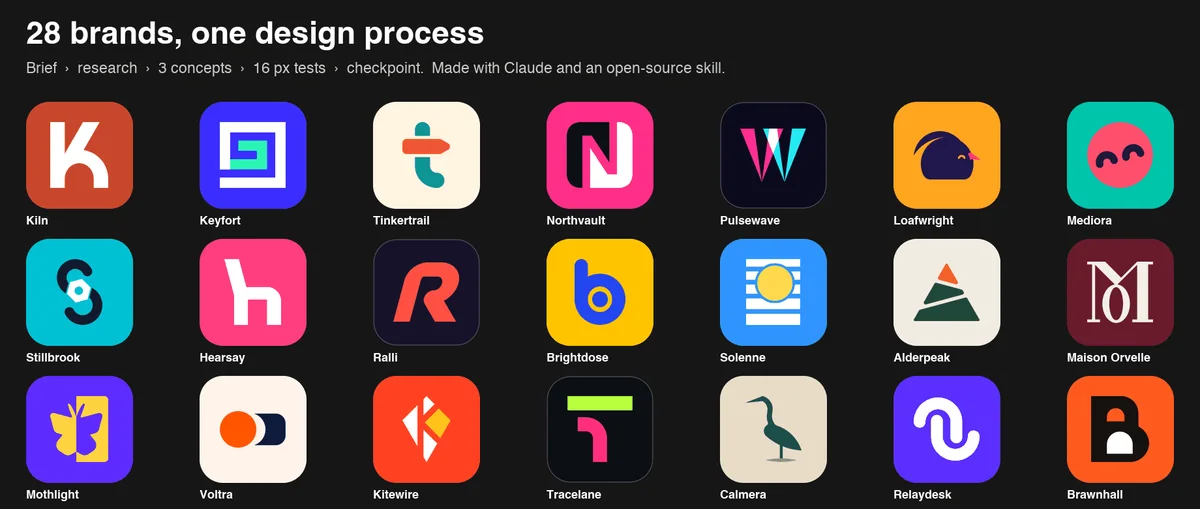
An image generator draws a logo that turns to mush as an icon and never works as a vector. This skill makes Claude work like an identity designer: a brief, a look at your category, three concepts in SVG, a test at 16 pixels and in one color, and only then the files.
What it is
The logo-design skill for Claude Code and other agents. It takes you from a brief to finished SVG files and a brand guide. Open source, MIT. The process:
- Brief: questions about your business, or clearly written assumptions.
- Research: what your category usually looks like, from a library of 1,400+ real logos. They are studied, not copied.
- Concepts: 8 to 12 one-line ideas, three of them built in SVG.
- Checks: an SVG audit, a 16 pixel test, one color, reversed, and next to competitors.
- Checkpoint: the concepts on one board with a recommendation, then it waits for your choice.
- Kit: colors, layout versions, a presentation board, icons and a guide.
Steps
Step 1. Open Claude Code
Open it in an empty folder for the logo.
Step 2. Describe your business in the prompt
Add the name, what you do and the feeling the logo should give. Claude installs the skill and asks for whatever is missing.
Step 3. Pick a direction
Claude shows three concepts with a recommendation and stops. Pick a direction or ask for changes, and only then does it build the full kit.
Copy this into Claude Code
Install the logo-design skill from github.com/kaankiziltug/logo-design-skill and check that you can see it. Then design a logo for my business: [name], [what I do], [the feeling the logo should give and what I definitely don't want in it]. Follow the skill's process: first ask the missing brief questions, then show me three concepts with the small-size check and your recommendation. Explain in simple words why you suggest each one. Build the file kit only after I pick a direction. If a program for rendering images is missing, install it yourself. If something doesn't install, explain what the problem is and fix it. I'm not a programmer: anything you can do yourself, do it yourself.
Want this working for your business?
- AI agents for your business
- Automations for the work you repeat
- 1:1 consulting calls
Good to know
Say what you don't want
In the repo's examples, the brief bans category clichés outright: no coins, piggy banks or bank blue for finance, no chat bubbles or padlocks for software. Bans like that make the mark your own.
Look at it small
Every concept is shown at 64, 32 and 16 pixels, so you see right away whether it reads in a browser tab or as an avatar.
Files, not a picture
The kit includes black, white and one-color versions, an app icon, favicons and PNGs in the sizes you need.
The honest read
- The skill renders its own drafts and checks them with the model's eyes, so it works best with a model that can see images. Claude can.
- The logos in the library belong to their owners and are not covered by the MIT license. They are there to study, not to use in your work.
- The 28 brands in the examples were made up by the author to show the process.
Want this built for your business?
I build AI agents and automations for businesses, and do 1:1 consulting calls. Message me on Instagram with what your business does, and I'll tell you what can be automated.
Message me on Instagram