Mesh Avatar Studio: turn one drawing into a moving avatar with Claude Code
- drawing is all you need
- 1
- GitHub stars
- 468
- open source
- MIT
You have one drawing of a character and want it to move: blink, talk, turn its head, breathe. Mesh Avatar Studio has Claude Code rig the drawing for you, then lets you fix anything by dragging dots, and the finished avatar can follow your face on camera for a stream.
What it is
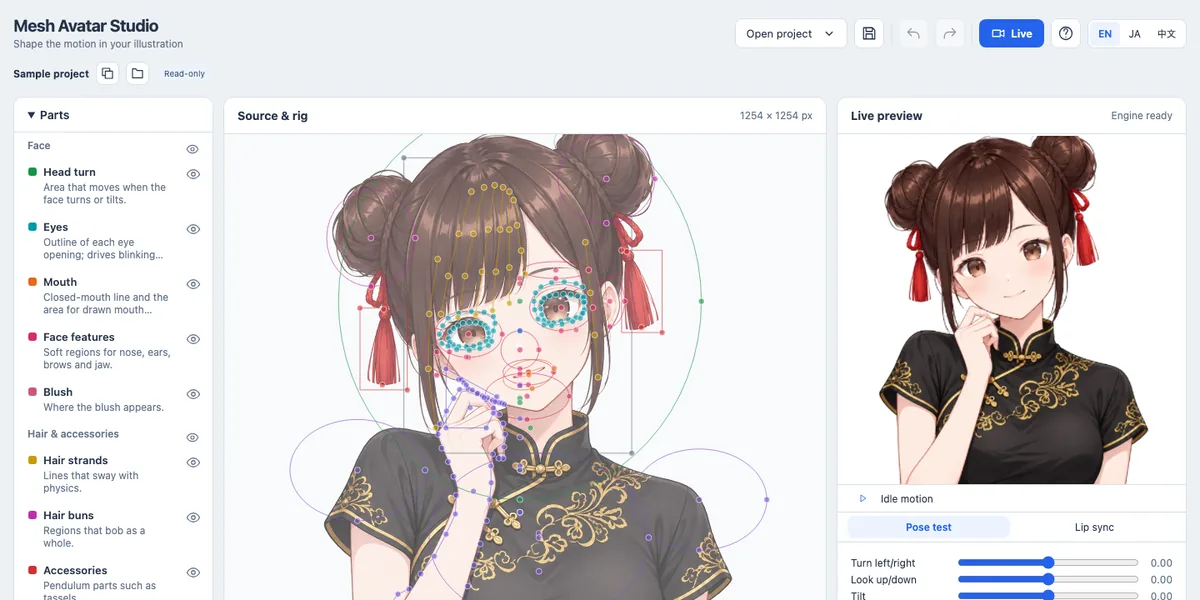
An open-source avatar studio that runs on your computer. A coding agent prepares the avatar from your image, and a local editor with a live preview lets you fine-tune it. Open source, MIT. What you get:
- Rigging by Claude: it places the rig on your drawing, cuts it into layers and reviews the avatar in fixed poses.
- Drag to fix: pick a part like eyes, mouth or hair, drag its dots, and the preview follows right away.
- Pose test: turn and tilt the head, close the eyes and check the mouth shapes for each vowel.
- Live: your webcam drives the avatar, with optional microphone lip sync.
- Streaming: copy a link into OBS as a browser source. The transparent background works there directly.
Your camera video and microphone audio stay on your machine. Only the avatar's motion values reach the stream view.
Steps
Step 1. Prepare your drawing
The best input is a front-facing, head-and-shoulders PNG with a transparent background.
Step 2. Paste the prompt in Claude Code
Claude downloads the studio, installs what it needs, opens the editor with the sample character and then builds your avatar from your drawing.
Step 3. Fine-tune and go live
Open your project in the editor, run the pose test and drag any dots that look off. Then open Live, start the camera and calibrate.
Copy this into Claude Code
Download Mesh Avatar Studio from github.com/shinshin86/mesh-avatar-studio into this folder. Check that I have Node.js 22.17 or newer and install whatever is missing. Start the editor and open it for me in the browser with the sample character. Then create an avatar from my drawing following the project's agent guide: [path to your PNG]. Tell me in simple words how to open my project in the editor and check it with the pose test. If something doesn't install, explain what the problem is and fix it. I'm not a programmer: anything you can do yourself, do it yourself.
Want this working for your business?
- AI agents for your business
- Automations for the work you repeat
- 1:1 consulting calls
Good to know
Try the sample first
The editor opens with a sample character, Miko. Play with her dots and the preview before you bring your own drawing.
Drawn eyes and mouths
Without extra drawings, the eyes and mouth move by stretching the image. Drawn closed eyes and vowel mouths make blinking and talking look much more natural.
Light that follows you
Optional lighting adds shading that follows a light you drag over the avatar, and the OBS link keeps those settings.
The honest read
- Claude Code can't draw the extra eyes and mouths itself. It prepares masks and prompts for you to take to an image generator. Codex can draw them with its built-in image generation.
- The author recommends Claude Opus 5.5 in Claude Code. Results depend on how well the model reads coordinates on your image.
- The sample character Miko is not under the MIT license. Her images come with their own usage terms.
- On Windows, create the projects folder under your own account first, or the editor may not be able to read it.
Want this built for your business?
I build AI agents and automations for businesses, and do 1:1 consulting calls. Message me on Instagram with what your business does, and I'll tell you what can be automated.
Message me on Instagram