OpenMontage: Claude Code becomes a whole video studio
- GitHub stars
- 65.1K
- production tools
- 100+
- API keys for a first video
- 0
You describe a video in one sentence, and Claude Code runs the whole production: it researches the topic, writes the script, narrates it, finds or makes the visuals, edits and renders. You approve each creative step before it moves on.
What it is
An open-source production system that runs inside your AI coding assistant. Your assistant is the director, and OpenMontage gives it the pipelines, tools and instructions. Open source, AGPL 3.0. What it covers:
- Pipelines: animated explainers, trailers, screen demos, talking heads, podcast clips, dubbing, documentary montages and more.
- Real footage: it can cut a video from actual motion clips from open archives like NASA, Archive.org and Wikimedia Commons.
- Reference video: paste a Short, Reel or TikTok you like, and it keeps the pacing and hook but changes the topic.
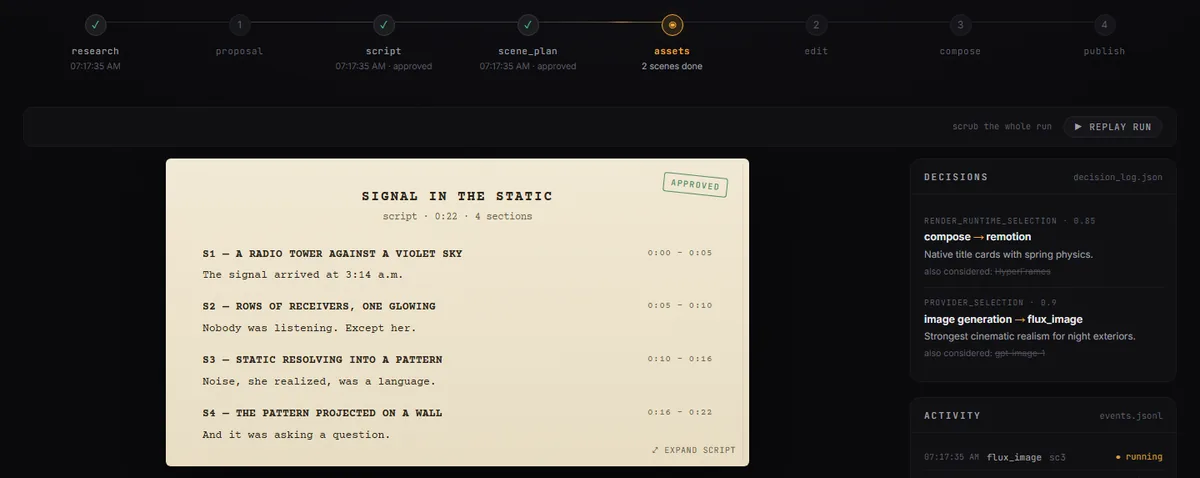
- Live board: a local storyboard shows each stage, the script, every scene and every provider choice as it happens.
Before you see anything, it checks its own render: frames, audio levels and subtitles.
Steps
Step 1. Open Claude Code
Open it on your computer in a folder where the project can live. It needs a few programs for video work, and Claude installs them.
Step 2. Paste the prompt
Claude downloads OpenMontage, sets it up without any paid keys and renders the built-in demo, so you see it works before you ask for anything.
Step 3. Ask for your first video
Describe a short video in one sentence, like a 45-second explainer about why the sky is blue. Approve the script and the storyboard when it asks.
Copy this into Claude Code
Set up OpenMontage from github.com/calesthio/OpenMontage in this folder. Check which programs it needs for my system and install whatever is missing. Don't add any paid API keys for now. Read its agent guide, render the built-in demo that needs no keys and show me the result. Then make a 45-second animated explainer about why the sky is blue, and stop for my approval at the script and the storyboard. If something doesn't install, explain what the problem is and fix it. I'm not a programmer: anything you can do yourself, do it yourself.
Want this working for your business?
- AI agents for your business
- Automations for the work you repeat
- 1:1 consulting calls
Good to know
Start from a video you like
Paste a YouTube Short, Reel or TikTok and ask for something like it about your topic. You get 2 to 3 concepts and a cost estimate before anything is generated.
Real footage only
Ask for a documentary montage and say use real footage only. It builds the video from open archives instead of animating still images.
Spend caps
When you add paid keys, it estimates the cost before generating, and you can set spend caps and approval limits.
Have a GPU?
It can generate video locally with open models, so clips don't go through a paid service.
The honest read
- It's licensed under AGPL 3.0. Using it to make your own videos is fine. If you change the code and run it as a service for others, you have to publish your changes.
- With no keys, videos are built from images, free footage and an offline voice. AI video clips and premium voices need paid provider keys.
- Your coding assistant runs the whole production, so every video also uses your Claude Code limits.
- The setup is heavy: Python, FFmpeg and Node.js. Let Claude handle it.
Want this built for your business?
I build AI agents and automations for businesses, and do 1:1 consulting calls. Message me on Instagram with what your business does, and I'll tell you what can be automated.
Message me on Instagram