Recordly: screen recordings that look edited, without editing
- GitHub stars
- 32.8K
- systems: Mac, Windows, Linux
- 3
- export formats
- MP4, GIF
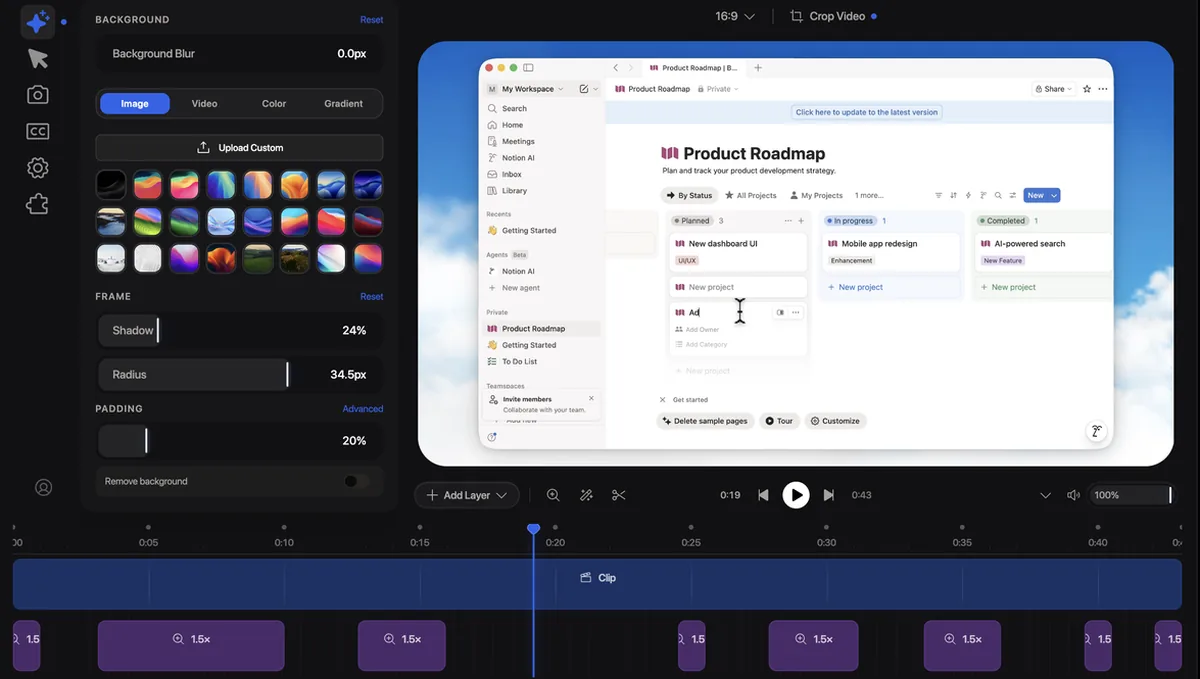
You record a demo of your product and it looks flat: small text, a jumpy cursor, nothing to look at. Recordly zooms in where you work, smooths the cursor and puts the video in a clean frame, so a raw screen recording looks like someone edited it.
What it is
A desktop app for recording and editing your screen. Record a whole display or one app window with your mic and system audio, and the recording opens straight in the editor. Open source, AGPL 3.0. What you get:
- Auto zooms: zoom suggestions based on where your cursor is busy.
- Cursor polish: smoothing, motion blur, click bounce and size.
- Styled frame: wallpapers, gradients, blur, padding, rounded corners and shadows.
- Webcam bubble: your camera as an overlay that can follow the zoom.
- Timeline: trims, speed changes, text and image notes, extra audio.
- Export: MP4 or GIF, with quality, size and aspect ratio settings.
Steps
Step 1. Open Claude Code
Open it on the computer you record on. Recordly runs on macOS 14 or newer, Windows 10 build 19041 or newer, and Linux.
Step 2. Paste the prompt
Claude picks the right download for your system from the official releases, installs Recordly and opens it. If your system asks for screen recording permission, it tells you where to allow it.
Step 3. Record your first demo
Pick a screen or a window, choose your mic, record, then stop. The editor opens by itself: use the zoom suggestions, pick a background and export an MP4.
Copy this into Claude Code
Install Recordly on this computer from the official releases at github.com/webadderallorg/Recordly/releases. Pick the right file for my system, install it and open the app. If my system needs screen recording or microphone permission, tell me exactly where to click to allow it. Then explain in simple words how to record my first demo and export it as an MP4. If something doesn't install, explain what the problem is and fix it. I'm not a programmer: anything you can do yourself, do it yourself.
Want this working for your business?
- AI agents for your business
- Automations for the work you repeat
- 1:1 consulting calls
Good to know
Record one window
Record a single app window instead of the whole screen. The zooms land on your work, and nothing from your other windows ends up in the video.
GIFs for posts
Export a short loop as a GIF with its own frame rate, loop and size presets. Handy for a post or a product page.
Come back later
Your work saves as a Recordly project file, so you can change zooms and the frame later without recording again.
Extensions
A community marketplace adds things like click sounds, device frames, browser mockups and wallpapers.
The honest read
- On Linux the real cursor can't be hidden, so with the styled cursor on, the export may show both. System audio on Linux usually needs PipeWire.
- On Windows builds older than 19041, the real cursor may stay visible in recordings.
- GitHub can't name the license because the file adds terms on top of AGPL 3.0: you can't use the Recordly name for your own project, and code built from Recordly must credit it. Their own summary says you may use the app for any purpose.
- It records and edits. Talking, clicking and the script are still on you.
Want this built for your business?
I build AI agents and automations for businesses, and do 1:1 consulting calls. Message me on Instagram with what your business does, and I'll tell you what can be automated.
Message me on Instagram