The skill file behind my code-only 3D motion film
- frames, rendered at 60 fps
- 2,571
- skill file for Claude Code
- 1
- formats: 9:16 and 16:9
- 2
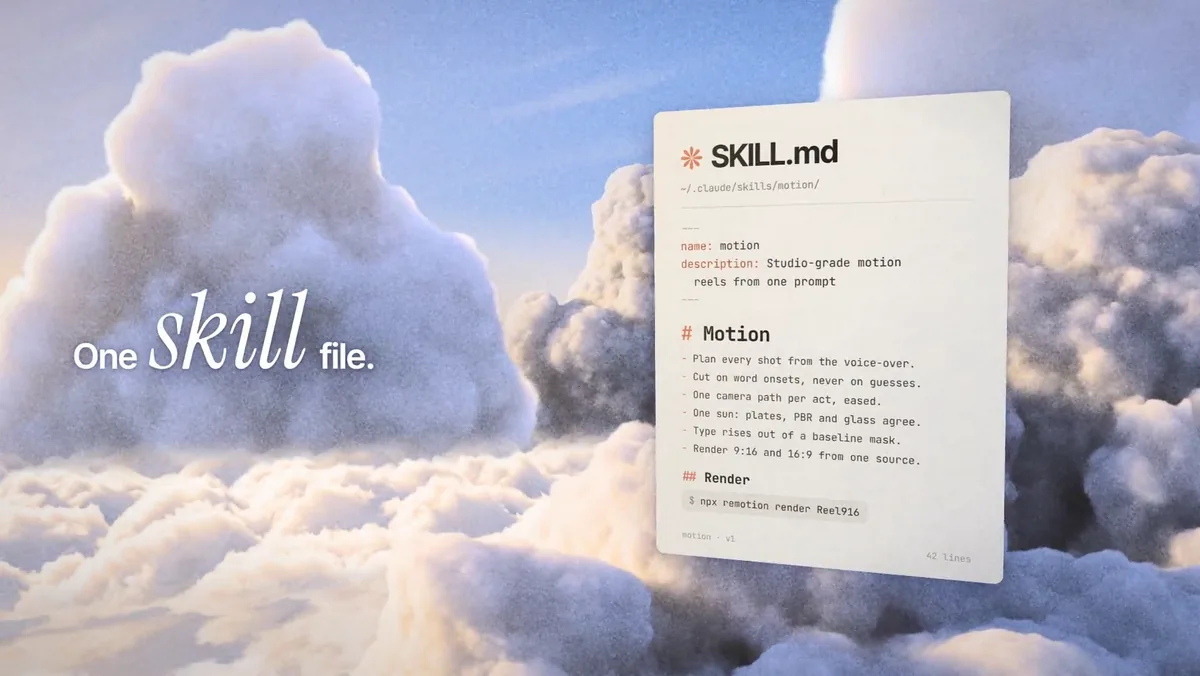
Every frame of that film is code. Claude Code wrote it in Remotion and rendered all 2,571 frames, with no After Effects. This is the skill file behind it, free: the workflow, the design rules and the fixes from that film, in one file for Claude Code. Paste one prompt, and Claude sets it up and makes your video with it.
What it is
A skill is a file of instructions that Claude Code reads before it works. This one turns Claude into a motion designer: you describe the video in plain words, and it plans, animates, checks and renders it.
It is the method behind the film you just watched: 42.85 seconds at 60 fps, a 3D camera flying through clouds, glass panels and kinetic type, made in Remotion with three.js, in a 9:16 and a 16:9 version.
Claude works in a fixed order: a short brief, a storyboard timed to the beat, a design bible, the scenes, test frames it looks at and fixes, the full render, then a contact sheet of the final file and one more round of fixes.
Sound comes from you: give Claude your music and sound effects, files you own or have a license for, and it places them on the beats of the storyboard. The skill makes no voice or sound of its own.
It carries the fixes for the problems that killed our own renders, so Claude doesn't hit them again.
Every package comes from a fixed list I prepared and tested, the fonts included, and each file is checked by its hash before it is used.
Steps
Step 1. Open Claude Code in a new folder
Make a new empty folder for your videos and open Claude Code in it. The skill and every project file stay in that folder.
Step 2. Paste the prompt
Claude downloads the skill file and two small files with the exact list of packages from this blog, checks each one against its fingerprint, puts the skill into this folder and sets up Remotion. Before each install it tells you what it is and waits for your OK: approve what the prompt lists and say no to anything outside the folder. If Node.js is missing, it asks you to install it from nodejs.org, like any other app.
Step 3. Describe your video
Say what you want in plain words: what it's for, how long, vertical or horizontal, the words on screen, and attach your music if you have it. Claude shows you the storyboard first, then animates it, checks test frames and renders. When it's done, it tells you where the MP4 is. To change something, say it in plain words, for example make the title bigger, and it renders again.
Copy into Claude Code
Set up the cinematic-motion skill in this folder, then make a video with me using it.

SETUP
Work only inside the current folder, and never delete or overwrite files that are already here. First check that this computer has Node.js 20 or newer. If it is missing or older, stop and tell me to install Node.js LTS from nodejs.org with its normal installer, then wait for me.
Download these three files into a new folder named cinematic-motion-download here, each saved byte for byte, not through a tool that summarizes or rewrites pages. If that folder already exists or is a symbolic link, stop and ask me.
https://blog.alekseimedia.com/assets/kits/glass-skill/SKILL.md
https://blog.alekseimedia.com/assets/kits/glass-skill/package.json
https://blog.alekseimedia.com/assets/kits/glass-skill/package-lock.json
Check the SHA-256 of each one: SKILL.md fc62803f4b23fbf5546139e90ef89862bb3860a9c2b7a3fbc8fc525a9af7bf22, package.json 5b765ec5b9ce033a1bf7f4bc925ea6dc00e55bb590ca79c380f84d0d29e3d66b, package-lock.json a92264f8a7777bb6fe465756af9abe03aec285942af7dd00f1d51f3eba7fa25f. If one doesn't match, delete the cinematic-motion-download folder you just made, don't use any of the files, stop and tell me.
Only when all three match: if .claude/skills/cinematic-motion already exists, or any part of that path is a symbolic link, stop and ask me. Otherwise create the folder .claude/skills if it is missing and move the whole cinematic-motion-download folder there in one rename, so it becomes .claude/skills/cinematic-motion.
Install packages only from these pinned files, as the skill describes: npm ci --ignore-scripts from the lock file, which pins every npm package and its hash, the fonts included, inside a new project folder the skill creates here. Don't add, update or remove a package. The only other download is the one the skill names: the browser Remotion renders with, which the skill pins by its SHA-256 too and checks before it is used. Never use sudo. Before each install or download, tell me in one line what it is and wait for my OK. Don't ask me to run commands.

THEN
Read .claude/skills/cinematic-motion/SKILL.md in full and follow it for everything below. Ask me what video I want, in one short message: what it's for, how long, vertical 9:16, horizontal 16:9 or both, the words on screen, and any colours, logo, references, music or sound effects I have. Show me the storyboard before you build. When the video is done, tell me where the MP4 is and how to ask for changes.

I'm not a programmer: do everything you can yourself.
Want this working for your business?
- AI agents for your business
- Automations for the work you repeat
- 1:1 consulting calls
Good to know
Your next videos
The skill stays in the folder. Next time, open Claude Code in the same folder and describe a new video: Claude picks the skill up and starts a new project next to the old one.
Give it references
Screenshots of a motion video you like, your logo or your brand colours bring the result closer to what you have in mind. Attach them when Claude asks what you want.
Music and sound
Give Claude your own music and sound effects, files you own or have a license for, and it places them on the beats. Without them the video is silent: the skill makes no sound of its own.
The honest read
- Rendering 3D at 60 fps takes a while. The film above took three to four hours per format on a 4-core server with no graphics card; a short video on a laptop takes from minutes to hours. Keep the computer on until Claude says it's done.
- Your first video won't match mine frame for frame. That film went through many rounds of test frames and fixes. Claude does the same rounds, and you steer it in plain words.
- A long run like this, with test renders and fixes, uses a big part of your Claude limits.
- Every package comes from a fixed, tested list and is checked by its hash, so nothing changes under you. It still runs on your computer with your normal user access, like any app you install: the folder keeps the files tidy, it is not a sandbox.
- The browser Remotion renders with is one more download, from Remotion's or Google's servers, and Claude checks it against its fingerprint before using it, like every other file. The fonts are part of the fixed list.
- It runs on macOS (Apple silicon or Intel), 64-bit Windows and recent 64-bit Linux.
- The voiceover in my film came from our own voice pipeline, which is not part of this file. The skill gives you the method, the 3D setup and the render fixes, and places the music and sound effects you bring.
- Remotion's license is free for individuals, for-profit organizations with up to 3 employees and non-profits. Bigger for-profit companies need a company license: see the Remotion license page.
Want this built for your business?
I build AI agents and automations for businesses, and do 1:1 consulting calls. Message me on Instagram with what your business does, and I'll tell you what can be automated.
Message me on Instagram